Building Elevation Grids
Building Elevation Grids
Motivation
- Building terrains is very common
- Hills, valleys, mountains
- Other tricky uses…
- You can build a terrain using an IndexedFaceSet node
- You can build terrains more efficiently using an ElevationGrid node
Syntax: ElevationGrid
An ElevationGrid geometry node creates terrains:
- xDimension and zDimension - grid size
- xSpacing and zSpacing - row and column distances
XML Encoding
1
2
3
4
5
6
7
8
9
<Shape>
  <Appearance><!-- ... --></Appearance>
  <ElevationGrid
      xDimension='3'
      zDimension='2'
      xSpacing='1'
      zSpacing='1'
      ... />
</Shape>
Classic VRML Encoding
1
2
3
4
5
6
7
8
9
10
Shape {
  appearance Appearance { ... }
  geometry ElevationGrid {
    xDimension 3
    zDimension 2
    xSpacing 1
    zSpacing 1
    ...
  }
}
An ElevationGrid geometry node creates terrains:
- height - elevations at grid points
XML Encoding
1
2
3
4
5
6
7
<Shape>
  <Appearance><!-- ... --></Appearance>
  <ElevationGrid
      ...
      height='0, -0.5, 0,
              0.2, 4, 0'/>
</Shape>
Classic VRML Encoding
1
2
3
4
5
6
7
8
9
10
Shape {
  appearance Appearance { ... }
  geometry ElevationGrid {
    ...
    height [
      0, -0.5, 0,
      0.2, 4, 0
    ]
  }
}
An ElevationGrid geometry node creates terrains
- solid - shape is solid
- ccw - faces are counter-clockwise
XML Encoding
1
2
3
4
5
6
7
<Shape>
  <Appearance><!-- ... --></Appearance>
  <ElevationGrid
      solid='true'
      ccw='true'
      ... />
</Shape>
Classic VRML Encoding
1
2
3
4
5
6
7
8
Shape {
  appearance Appearance { ... }
  geometry ElevationGrid {
    ...
    solid TRUE
    ccw TRUE
  }
}
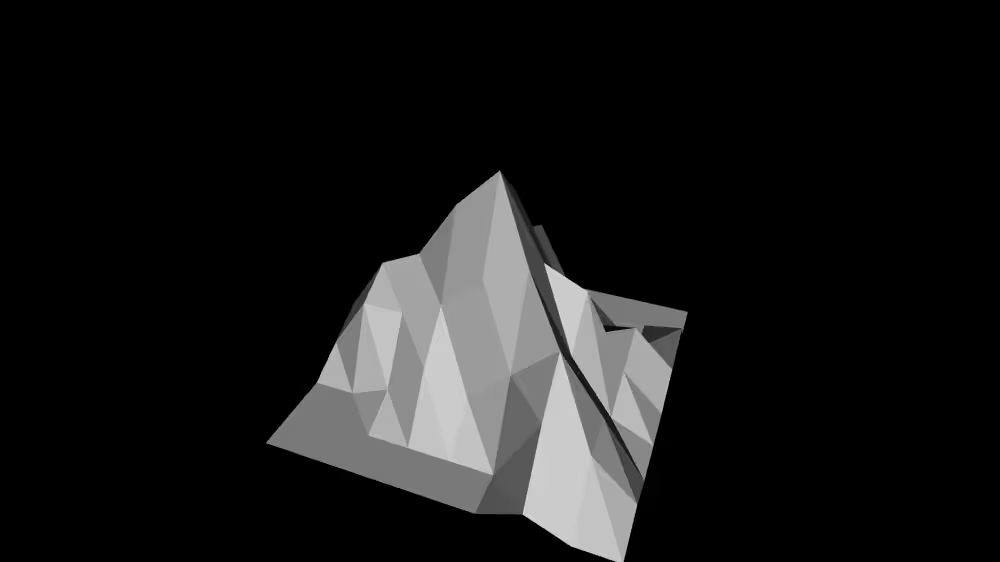
A Sample Elevation Grid
XML Encoding
1
2
3
4
5
6
7
8
9
10
11
12
13
14
15
16
17
18
<Shape>
  <Appearance><!-- ... --></Appearance>
  <ElevationGrid
      xDimension='9'
      zDimension='9'
      xSpacing='1'
      zSpacing='1'
      solid='false'
      height='0, 0, 0.5, 1, 0.5, 0, 0, 0, 0,
              0, 0, 0, 0, 2.5, 0.5, 0, 0, 0,
              0, 0, 0.5, 0.5, 3, 1, 0.5, 0, 1,
              0, 0, 0.5, 2, 4.5, 2.5, 1, 1.5, 0.5,
              1, 2.5, 3, 4.5, 5.5, 3.5, 3, 1, 0,
              0.5, 2, 2, 2.5, 3.5, 4, 2, 0.5, 0,
              0, 0, 0.5, 1.5, 1, 2, 3, 1.5, 0,
              0, 0, 0, 0, 0, 0, 2, 1.5, 0.5,
              0, 0, 0, 0, 0, 0, 0.5, 0, 0,'/>
</Shape>
Classic VRML Encoding
1
2
3
4
5
6
7
8
9
10
11
12
13
14
15
16
17
18
19
20
21
Shape {
  appearance Appearance { ... }
  geometry ElevationGrid {
    xDimension 9
    zDimension 9
    xSpacing 1
    zSpacing 1
    solid FALSE
    height [
      0, 0, 0.5, 1, 0.5, 0, 0, 0, 0,
      0, 0, 0, 0, 2.5, 0.5, 0, 0, 0,
      0, 0, 0.5, 0.5, 3, 1, 0.5, 0, 1,
      0, 0, 0.5, 2, 4.5, 2.5, 1, 1.5, 0.5,
      1, 2.5, 3, 4.5, 5.5, 3.5, 3, 1, 0,
      0.5, 2, 2, 2.5, 3.5, 4, 2, 0.5, 0,
      0, 0, 0.5, 1.5, 1, 2, 3, 1.5, 0,
      0, 0, 0, 0, 0, 0, 2, 1.5, 0.5,
      0, 0, 0, 0, 0, 0, 0.5, 0, 0,
    ]
  }
}
Example
Summary
- An ElevationGrid node efficiently creates a terrain
- Grid size is specified in the xDimension and zDimension fields
- Grid spacing is specified in the xSpacing and zSpacing field
- Elevations at each grid point are specified in the height field
This post is licensed under CC BY 4.0 by the author.