RenderedTexture
Overview
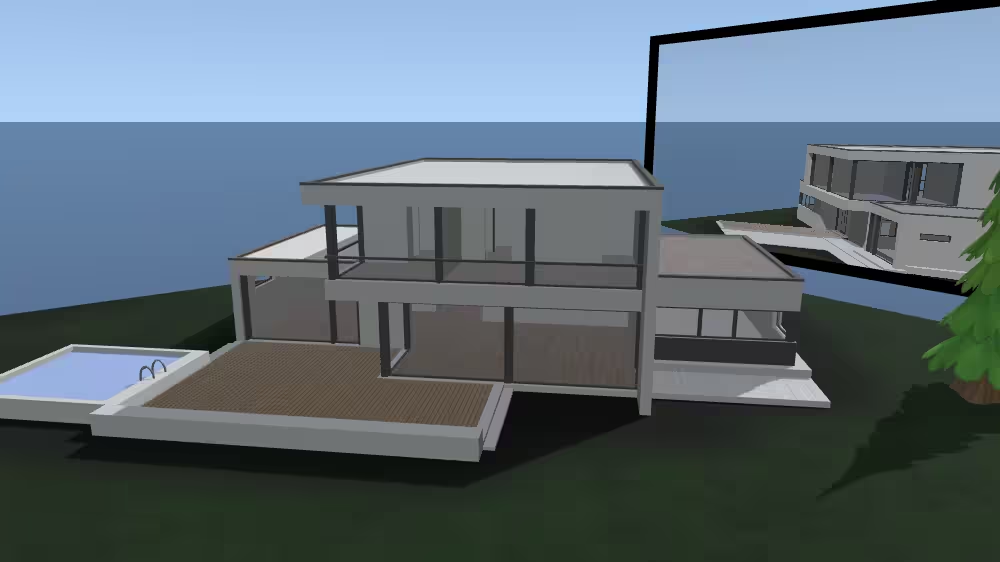
RenderedTexture is a texture node that renders the view from a local viewpoint or separate scene into an offscreen buffer, producing an image or depth map that can be rendered from model geometry in real time. The output renderings can optionally be saved via the url field as a local file or a stream source. RenderedTexture enables effects such as dynamic reflections, live video screens, or portal views by continuously updating the texture based on the rendered content. RenderedTexture creates a 2D-image texture map using a numeric array of pixel values. Texture maps have a 2D coordinate system (s, t) horizontal and vertical, with (s, t) texture-coordinate values in range [0.0, 1.0] for opposite corners of the image.
The RenderedTexture node belongs to the Texturing component and requires at least support level 4, its default container field is texture. It is available from X3D version 4.1 or higher.
Info: Please note that this node is still experimental, i.e. the functionality of this node may change in future versions of X_ITE.
Hierarchy
1
2
3
4
5
6
+ X3DNode
  + X3DAppearanceChildNode
    + X3DTextureNode
      + X3DSingleTextureNode
        + X3DTexture2DNode
          + RenderedTexture (X3DUrlOutputObject)*
* Derived from multiple interfaces.
Fields
| Type | Access Type | Name | Default Value |
|---|---|---|---|
| SFNode | [in, out] | metadata | NULL |
| SFString | [in, out] | description | ”” |
| SFBool | [in, out] | enabled | TRUE |
| SFBool | [in, out] | replaceImage | TRUE |
| SFInt32 | [in, out] | maxNumberFrames | 1000 |
| MFString | [in, out] | url | [ ] |
| SFBool | [in, out] | singleFrame | TRUE |
| SFTime | [in, out] | updateInterval | 0.1 |
| SFInt32 | [in, out] | width | 128 |
| SFInt32 | [in, out] | height | 128 |
| SFInt32 | [in, out] | colorDepth | 4 |
| SFBool | [in, out] | depthMap | FALSE |
| SFBool | [out] | isActive | |
| SFBool | [ ] | repeatS | TRUE |
| SFBool | [ ] | repeatT | TRUE |
| SFNode | [ ] | textureProperties | NULL |
| MFNode | [in, out] | children | [ ] |
SFNode [in, out] metadata NULL [X3DMetadataObject]
Information about this node can be contained in a MetadataBoolean, MetadataDouble, MetadataFloat, MetadataInteger, MetadataString or MetadataSet node.
Hint
SFString [in, out] description “”
Author-provided prose that describes intended purpose of the url asset.
Hint
- Many XML tools substitute XML character references for special characters automatically if needed within an attribute value (such as & for & ampersand character, or " for “ quotation-mark character).
SFBool [in, out] enabled TRUE
Enables/disables node operation.
SFBool [in, out] replaceImage TRUE not supported
Whether only a single updated image file or multiple image files can be saved.
SFInt32 [in, out] maxNumberFrames 1000 [0,∞)
Indicates the maximum number of independent frame files (or movie frames) that can be saved for a single series of image captures. A value of 0 indicates no limit.
MFString [in, out] url [ ] not supported
The url field typically defines a relative address to a file name that can be used for storing one or more rendered textures, and can also provide a destination for output of successive image files as a video file or video stream.
Hints
- MFString arrays can have multiple values, so separate each individual string by quote marks “https://www.web3d.org” “https://www.web3d.org/about” “etc.”
- Alternative XML encoding for quotation mark “ is " (which is an example of a character entity).
- Can replace embedded blank(s) in url queries with %20 for each blank character.
- X3D Scene Authoring Hints, urls
Warnings
- Strictly match directory and filename capitalization for http links! This is important for portability. Some operating systems are forgiving of capitalization mismatches, but http/https url addresses and paths in Unix-based operating systems are all case sensitive and intolerant of uppercase/lowercase mismatches.
- Direct or indirect recursion by Inline and/or ExternProtoDeclare url reloading is a security error.
SFBool [in, out] singleFrame TRUE
If TRUE only a single image is captured, otherwise continuous updates are captured.
SFTime [in, out] updateInterval 0.1 [0,∞)
Indicates time intervals between render captures when the update field is “ALWAYS”. A value of 0 indicates full frame rate for render captures.
SFInt32 [in, out] width 128 [0,∞)
Image height in pixels.
SFInt32 [in, out] height 128 [0,∞)
Image height in pixels.
SFInt32 [in, out] colorDepth 4 [1..4]
Number of color components for the rendered texture.
Hint
- Components in each pixel value are 1 (intensity), 2 (intensity alpha), 3 (RGB red green blue), 4 (RGBA red green blue alpha-opacity).
SFBool [in, out] depthMap FALSE
Indicates that a generated texture contains a depth buffer for the image, instead of a color buffer. Depth maps have a single component in each pixel of the output image.
SFBool [out] isActive not supported
Provides a TRUE event when the data output process becomes active, and a FALSE event when the data output process is stopped.
SFBool [ ] repeatS TRUE
Whether to repeat texture along S axis horizontally from left to right.
SFBool [ ] repeatT TRUE
Whether to repeat texture along T axis vertically from top to bottom.
SFNode [ ] textureProperties NULL [TextureProperties]
Optional single contained TextureProperties node that can specify additional visual attributes applied to corresponding texture images.
MFNode [in, out] children [ ] [X3DBackgroundNode|X3DChildNode|X3DViewpointNode|Fog|NavigationInfo]
The children field can include a single specific viewpoint from which to render to texture. If no Viewpoint or OrthoViewpoint is a child node, then the currently bound viewpoint in the scene is used as the perspective point. RenderedTexture can contain a single Background or TextureBackground node, a single Fog or LocalFog node, a single Viewpoint or OrthoViewpoint node, and a single grouping node for the portion of the scene graph to render.
Advice
Hints
- If no Viewpoint or OrthoViewpoint is a child node, then the currently bound viewpoint in the scene is used as the perspective point.
- Can contain a single TextureProperties node.
- Insert parent Shape and Appearance nodes before adding texture.
- X3D Scene Authoring Hints, Images and Videos
- If a texture is opaque, omitting values in the alpha channel can help avoid rendering artifacts related to transparency.
- Texture coordinates are reapplied (or else recomputed if textureTransform field initially NULL) whenever the corresponding vertex-based geometry changes.
- Texture mapping
- X3D Architecture 17.2.2 Lighting model
Warnings
- Aggregate file size can grow dramatically.
- See ComposedCubeMapTexture and TextureBackground for special containerField values.
- X3D Architecture version 4.1 draft is experimental and not fully implemented.
Example
Browser Compatibility
| Castle Game Engine | FreeWRL | X_ITE X3D Browser | X3D-Edit | X3DOM |
|---|---|---|---|---|