RenderedTexture
Overview
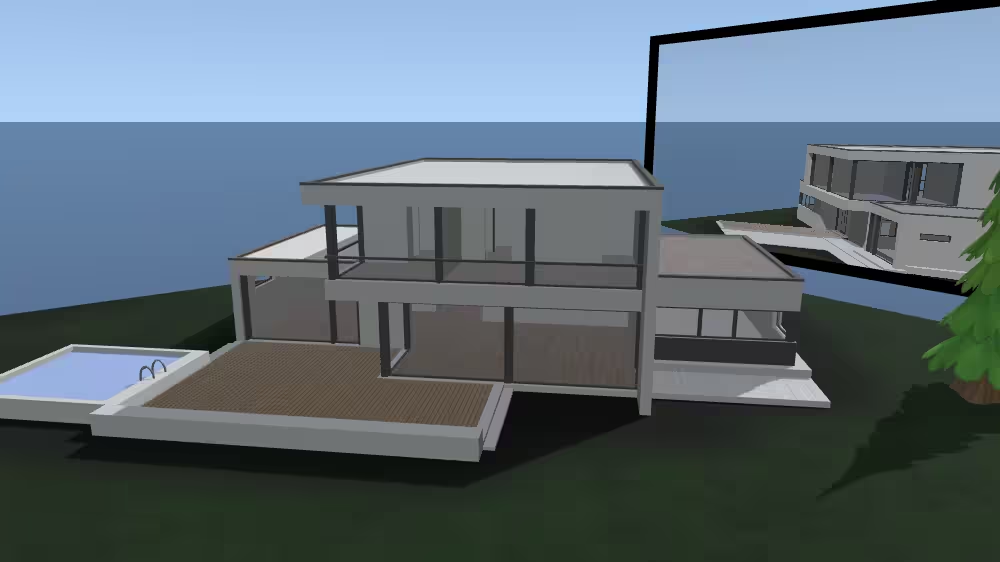
A RenderedTexture is a texture node that renders a separate scene or viewpoint into an offscreen buffer, producing an image that can be applied to geometry in real time. It enables effects such as dynamic reflections, live video screens, shadows, or portals by continuously updating the texture based on the rendered content.
The RenderedTexture node belongs to the Texturing component and requires at least support level 4, its default container field is texture. It is available from X3D version 4.1 or higher.
Info: Please note that this node is still experimental, i.e. the functionality of this node may change in future versions of X_ITE. This node is available in X_ITE, Castle and X3DOM.
Hierarchy
1
2
3
4
5
6
+ X3DNode
  + X3DAppearanceChildNode
    + X3DTextureNode
      + X3DSingleTextureNode
        + X3DTexture2DNode
          + RenderedTexture
Fields
| Type | Access Type | Name | Default Value |
|---|---|---|---|
| SFNode | [in, out] | metadata | NULL |
| SFString | [in, out] | description | ”” |
| SFString | [in, out] | update | “NONE” |
| MFInt32 | [in, out] | dimensions | [ 128, 128, 4, 1, 1 ] |
| SFBool | [in, out] | depthMap | FALSE |
| SFNode | [in, out] | background | NULL |
| SFNode | [in, out] | fog | NULL |
| SFNode | [in, out] | viewpoint | NULL |
| SFNode | [in, out] | scene | NULL |
| SFBool | [ ] | repeatS | TRUE |
| SFBool | [ ] | repeatT | TRUE |
| SFNode | [ ] | textureProperties | NULL |
SFNode [in, out] metadata NULL [X3DMetadataObject]
Information about this node can be contained in a MetadataBoolean, MetadataDouble, MetadataFloat, MetadataInteger, MetadataString or MetadataSet node.
Hint
SFString [in, out] description “”
Author-provided prose that describes intended purpose of the url asset.
Hint
- Many XML tools substitute XML character references for special characters automatically if needed within an attribute value (such as & for & ampersand character, or " for “ quotation-mark character).
SFString [in, out] update “NONE” [“NONE”|”NEXT_FRAME_ONLY”|”ALWAYS”]
update controls regeneration of the texture.
Warnings
- An object trying to render itself in the scene graph can cause infinite loops.
- Do not wrap extra quotation marks around these SFString enumeration values, since “quotation” “marks” are only used for MFString values.
MFInt32 [in, out] dimensions [ 128, 128, 4, 1, 1 ] [0,∞)
Sets the width, height, color components and number of multiple render targets (MRT).
SFBool [in, out] depthMap FALSE
The generated texture will contain the depth buffer of the image (instead of the color buffer as usual).
SFNode [in, out] background NULL [X3DBackgroundNode]
Allows you to specify a background node explicitly, which will then be used during the render-to-texture process. If the value is NULL the currently bound background in the scene is used.
SFNode [in, out] fog NULL [X3DFogObject]
Allows you to specify a fog node explicitly, which will then be used during the render-to-texture process. If the value is NULL the currently bound fog in the scene is used.
SFNode [in, out] viewpoint NULL [X3DViewpointNode]
Allows you to explicitly specify a viewpoint node from which to render to texture. If the value is NULL the currently bound viewpoint in the scene is used.
SFNode [in, out] scene NULL [X3DChildNode]
Sets a separate, potentially independent, sub-scene. If the value is NULL the current scene is used.
SFBool [ ] repeatS TRUE
Whether to repeat texture along S axis horizontally from left to right.
SFBool [ ] repeatT TRUE
Whether to repeat texture along T axis vertically from top to bottom.
SFNode [ ] textureProperties NULL [TextureProperties]
Optional single contained TextureProperties node that can specify additional visual attributes applied to corresponding texture images.
Example
Browser Compatibility
| Castle Game Engine | FreeWRL | X_ITE X3D Browser | X3D-Edit | X3DOM |
|---|---|---|---|---|